If you want your Eufy 25C vacuum to keep working at its best, changing the filters regularly is key. Dirty filters can reduce suction power and make your cleaning less effective.
But don’t worry—changing the filters is easier than you might think. In this guide, you’ll learn simple, step-by-step instructions to replace your Eufy 25C vacuum filters quickly. By the end, you’ll know exactly how to keep your vacuum running smoothly and your home cleaner than ever.
Let’s get started!
Eufy 25c Filter Types
The Eufy 25C vacuum uses two main filter types to keep your home clean. These filters help trap dust, dirt, and tiny particles. Each filter has a special role in keeping the vacuum working well. Understanding these filters makes changing them easier and keeps your vacuum in top shape.
Hepa Filter Features
The HEPA filter traps very small particles like pollen and pet dander. It helps improve air quality by catching allergens. This filter is made from fine fibers that block dust from escaping back into the air. It is washable and reusable, but needs regular cleaning. Replacing the HEPA filter on time keeps your vacuum efficient.
Foam Filter Benefits
The foam filter catches larger dust and debris before they reach the HEPA filter. It protects the vacuum motor from damage. This filter is soft and flexible, making it easy to remove and clean. Washing the foam filter with water helps it last longer. Changing the foam filter when worn out keeps the vacuum running smoothly.
When To Replace Filters
Knowing when to replace the filters on your Eufy 25C vacuum is important. Clean filters keep your vacuum working well. They also help keep your home air fresh. Replacing filters at the right time saves you money and effort.
Signs Of Clogged Filters
Notice less suction power during cleaning. The vacuum may make strange noises. Dust might escape from the vacuum exhaust. Your vacuum could overheat or stop suddenly. These signs suggest the filters need attention. Check the filters for dirt buildup or damage. Clean or replace them to restore performance.
Recommended Replacement Schedule
Eufy suggests changing filters every 2 to 3 months. This depends on how often you use the vacuum. Homes with pets may need more frequent changes. If you vacuum daily, replace filters sooner. Regular replacement prevents clogging and keeps suction strong. Keep a spare filter on hand for quick swaps.
Tools Needed For Filter Change
Changing the filter on your Eufy 25C vacuum is simple. Having the right tools makes the job easier. This guide lists what you need for a smooth filter change. Prepare these tools before starting to save time and avoid frustration.
Soft Brush Or Small Cleaning Brush
A soft brush helps remove dust from the filter area. It cleans without damaging delicate parts. Use a small brush for tight spots around the filter.
Replacement Filter
Always have a new filter ready. The replacement filter fits perfectly in the Eufy 25C. Using a fresh filter keeps your vacuum working well and improves air quality.
Microfiber Cloth
A microfiber cloth wipes dust from the vacuum’s surface. It keeps the filter compartment clean before installing the new filter. This cloth is gentle and effective for dust removal.
Small Screwdriver (optional)
Some Eufy 25C models may have screws near the filter. A small screwdriver helps open these parts safely. Check your vacuum to see if this tool is needed.
Preparing The Vacuum
Preparing your Eufy 25C vacuum for a filter change is simple. Follow clear steps to make the process safe and smooth. Proper preparation helps maintain your vacuum’s performance and extends its life.
Power Off And Unplug
First, turn off your Eufy 25C vacuum. Press the power button until it stops running. Then, unplug the charger from the wall socket. This step prevents any accidents during the filter change.
Accessing The Filter Compartment
Next, locate the filter compartment on your vacuum. Usually, it is near the dustbin. Open the compartment by pressing the release latch or button. Remove the dustbin carefully to reach the filter inside.
Removing Old Filters
Removing old filters from the Eufy 25C vacuum is a key step for good cleaning. Clean filters help the vacuum work better and last longer. This part explains how to take out the old filters safely and easily.
Detaching The Hepa Filter
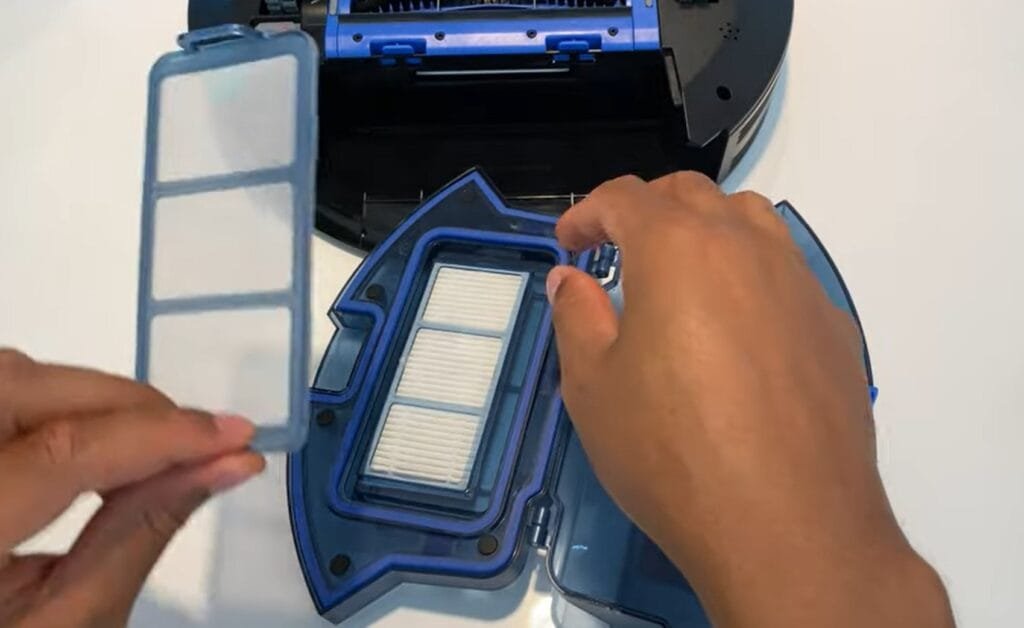
Start by opening the dustbin of your Eufy 25C. The HEPA filter sits inside the dustbin compartment. Gently pull the filter out by its edges. Avoid touching the mesh to keep it clean. Place the old HEPA filter aside for disposal.
Removing The Foam Filter
Next, find the foam filter located under the HEPA filter. Carefully lift the foam filter out of its slot. Check for dust or debris on it. Dispose of the foam filter if it looks worn or dirty. Both filters must be removed before adding new ones.
Cleaning The Filter Area
Cleaning the filter area of your Eufy 25C vacuum helps keep it working well. Dust and dirt can build up around the filter space. This buildup can reduce the vacuum’s suction power. Regular cleaning keeps the vacuum running smoothly and extends its life.
Vacuuming Dust Residue
Use a small brush or a handheld vacuum to remove dust. Gently vacuum around the filter area. Clear out all loose dirt and particles. This step helps stop dust from going back into the vacuum.
Wiping Filter Housing
Take a soft, dry cloth to wipe the filter housing. Clean all corners and edges carefully. Avoid using water or cleaning sprays. Keeping the housing clean prevents dirt from sticking inside.
Installing New Filters
Installing new filters in your Eufy 25C vacuum is an easy task. It helps keep the vacuum working well and improves cleaning. New filters stop dust and dirt from spreading back into the air.
Make sure you place each filter correctly. This keeps the vacuum running smoothly and extends its life. Follow the steps below to install the foam and HEPA filters with care.
Placing The Foam Filter
First, take out the old foam filter carefully. Throw it away or clean it if reusable. Now, grab the new foam filter. Place it gently into the filter slot. Ensure it fits snugly without bending or folding. The foam filter should cover the area fully. This filter catches large dust and dirt particles.
Inserting The Hepa Filter
Next, find the HEPA filter. This filter traps tiny particles like pollen and dust mites. Insert the HEPA filter right after the foam filter. Push it in until it clicks or feels secure. Avoid touching the filter surface to keep it clean. The HEPA filter must fit tightly to work well.
Resetting Filter Indicator
The filter indicator on the Eufy 25C vacuum helps track filter usage. It lights up when the filter needs cleaning or changing. Resetting this indicator is important after replacing the filter. This step ensures the vacuum shows accurate filter status.
Resetting the filter indicator is simple. It takes only a few seconds. This keeps your vacuum working well and alerts you at the right time.
Locate The Filter Indicator Light
First, find the filter indicator light on the vacuum. It is usually near the control panel. This light turns on to warn about filter issues.
Press And Hold The Reset Button
Next, press and hold the reset button. Hold it for about 3 seconds. The filter indicator light will blink and then turn off.
Confirm The Indicator Has Reset
Check the indicator after resetting. The light should stay off. This means the vacuum recognizes the new or cleaned filter.
Maintenance Tips For Longevity
Keeping your Eufy 25C vacuum in good shape helps it work longer and better. Simple care steps stop problems early. Clean filters and avoid water damage. These actions keep the vacuum running smoothly. Save time and money on repairs. Enjoy cleaner floors every day.
Regular Filter Cleaning
Take out the filter after each use. Tap it gently to remove dust and dirt. Wash the filter with water once a week. Let it dry completely before putting it back. Dirty filters slow down the vacuum and reduce suction. Clean filters help the vacuum pick up more dirt.
Avoiding Moisture Damage
Never use the vacuum on wet surfaces. Keep the filter away from water during cleaning. Store the vacuum in a dry place. Moisture can damage the filter and motor. Dry filters last longer and work better. Protect your vacuum from water to keep it safe.
Frequently Asked Questions
How Often Should I Change Filters On Eufy 25c?
Change Eufy 25C filters every 2 to 3 months. Frequent use or dusty homes may require earlier replacement. Regular changes maintain suction power and cleaning efficiency.
What Type Of Filters Does Eufy 25c Use?
Eufy 25C uses washable and replaceable HEPA filters. These filters trap fine dust and allergens effectively. Using genuine filters ensures optimal vacuum performance.
How Do I Remove The Old Filter From Eufy 25c?
Open the dustbin by pressing the release button. Pull out the old filter carefully without shaking. Dispose of it properly before inserting a new filter.
Can I Wash And Reuse Eufy 25c Filters?
Yes, washable filters can be rinsed under cold water. Let the filter air dry completely for 24 hours before reuse. Avoid using detergents or heat to dry.
Conclusion
Changing filters on your Eufy 25C vacuum keeps it working well. Clean filters help the vacuum pick up dirt better. Replace filters every few months for best results. This simple step saves time and keeps your home cleaner. Take care of your vacuum to make it last longer.
Easy filter changes mean less hassle for you. Keep your Eufy ready for every cleaning job. Small actions bring big benefits.