Your vacuum works hard to keep your home clean, but when was the last time you gave it some TLC? Knowing how to clean a vacuum properly can save you money, improve its performance, and extend its life.
If your vacuum isn’t picking up like it used to or making strange noises, it might be time for a deep clean. In this guide, you’ll discover simple, effective steps to get your vacuum back in top shape—so you can enjoy a cleaner home without the hassle.
Keep reading to learn how easy it is to maintain your vacuum and keep it running like new.
Gather Cleaning Supplies
Gathering the right cleaning supplies is the first step to clean a vacuum properly. Having everything ready saves time and avoids frustration. You need a few simple tools to get the job done well.
Cleaning Cloths
Soft cleaning cloths help wipe dust and dirt from the vacuum’s surface. Use microfiber cloths for better dust capture. Avoid rough fabrics that can scratch parts.
Brushes
A small brush removes hair and debris stuck in the brush roll or filters. Toothbrushes or paintbrushes work well. Choose brushes with soft bristles for gentle cleaning.
Compressed Air Can
Compressed air blows dust out of hard-to-reach places. It cleans vents and crevices inside the vacuum. Use short bursts to avoid damage.
Dish Soap And Water
Mild dish soap and warm water clean removable parts safely. Mix a small amount of soap with water. Avoid harsh chemicals that can harm vacuum parts.
Vacuum Bags Or Containers
Have fresh vacuum bags or empty containers ready. Replace bags or empty dust containers during cleaning. This keeps your vacuum working efficiently.
Unplug And Disassemble
Before cleaning your vacuum, always start by unplugging it. This step is crucial for safety. It stops the vacuum from turning on during cleaning.
After unplugging, take the vacuum apart carefully. Disassembling helps reach all the dirt and dust inside. It also makes cleaning each part easier and more effective.
Unplug The Vacuum
Find the power cord and pull the plug from the wall socket. Do not pull the cord itself. Hold the plug firmly to avoid damage.
Remove The Dust Container Or Bag
Open the vacuum’s dust container or bag compartment. Take out the dust container or bag gently. Dispose of the dust properly to avoid mess.
Detach The Brush Roll And Filters
Locate the brush roll and filters. Carefully remove them from the vacuum. Cleaning these parts separately improves vacuum performance.
Separate Other Removable Parts
Check for any other removable parts like hoses or attachments. Take them off to clean inside and outside thoroughly. This helps keep your vacuum working well.
Empty The Dustbin Or Replace Bags
Emptying the dustbin or replacing vacuum bags is a key step in cleaning your vacuum. It helps keep your vacuum working well and stops bad smells. Dustbins fill up fast, so empty them often. Bagged vacuums need new bags for best suction and hygiene.
How To Empty The Dustbin
Turn off the vacuum and unplug it. Remove the dustbin carefully. Take it outside or to a trash bin. Open the dustbin lid and dump the dirt. Tap the sides gently to remove stuck debris. Rinse the dustbin with water if needed. Let it dry completely before putting it back.
When To Replace Vacuum Bags
Check the bag after every few uses. Replace it if it looks full or heavy. A full bag lowers suction power. Use the exact bag model for your vacuum. Don’t overfill bags to avoid damage.
Tips For Maintaining Dustbins And Bags
Clean dustbins regularly to avoid clogs. Store spare bags in a dry place. Avoid touching the inside of new bags. Keep an eye on dustbin and bag condition. Change bags or empty bins before vacuuming large areas.
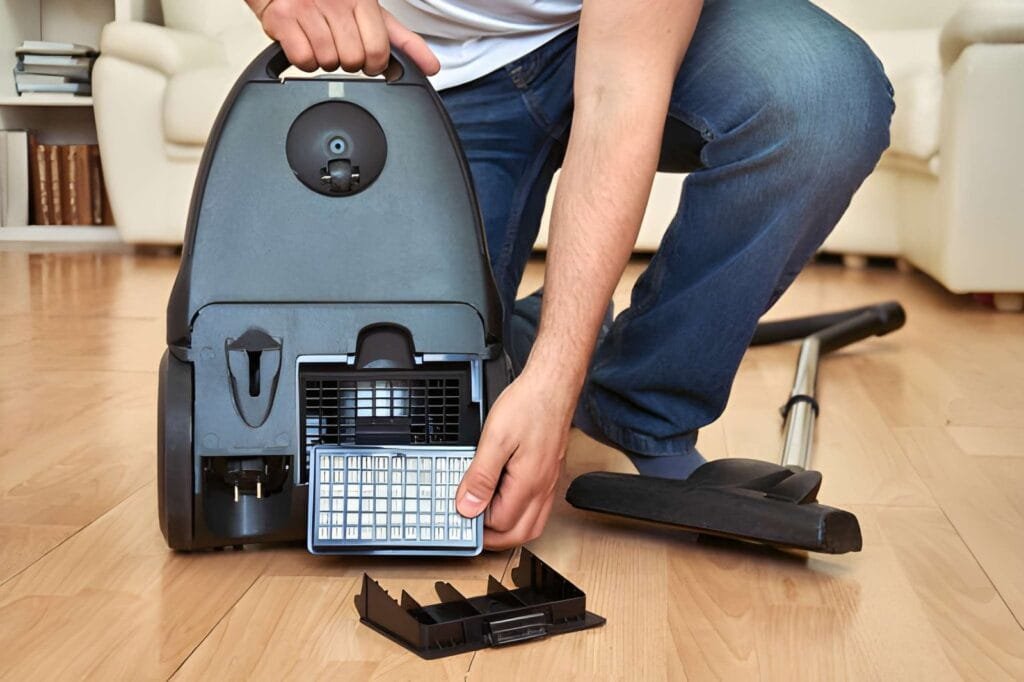
Clean Or Replace Filters
Cleaning or replacing your vacuum’s filters keeps it working well. Filters catch dust and dirt, stopping them from spreading back into the air. A dirty filter lowers suction and strains the motor. Regular care saves money and extends your vacuum’s life.
Washable Filters
Washable filters can be cleaned with water. Remove the filter carefully from the vacuum. Rinse it under cold water until clean. Avoid using soap or strong cleaners. Let the filter dry completely before putting it back. Never use a wet filter in your vacuum. This can damage the motor.
Non-washable Filters
Non-washable filters cannot get wet. Tap the filter gently to remove dust. Use a soft brush to clean hard-to-reach spots. Replace the filter if it looks worn or clogged. Check your vacuum’s manual for replacement instructions. Using a clean filter keeps the vacuum strong and fresh.
Remove Hair And Debris From Brushes
Removing hair and debris from vacuum brushes keeps your cleaner working well. Dirt, hair, and threads wrap around the brush roll. This build-up stops the brush from spinning freely. It lowers suction and cleaning power.
Regular cleaning of the brushes helps keep your vacuum in top shape. It also stops damage to the motor and belt. This section explains easy steps to clear hair and debris from vacuum brushes.
Gather Tools To Remove Hair And Debris
Start by collecting simple tools. Use scissors, a seam ripper, or a knife. Tweezers help pull out tough hair. A soft brush or cloth cleans loose dust. Prepare a trash bag to throw away waste.
Detach The Brush Roll Carefully
Unplug the vacuum first. Find the brush cover on the cleaner head. Remove screws or clips holding it in place. Take out the brush roll gently. Check the user manual if unsure.
Cut And Pull Hair Wrapped Around The Brush
Use scissors to cut hair and threads wrapped tight. Be careful not to cut the bristles. Pull the cut pieces away with fingers or tweezers. Remove as much hair as possible to free the brush.
Clean Loose Dirt From Brush And Housing
Brush off dust and small debris with a soft brush or cloth. Wipe the brush housing inside the vacuum head. Check for hidden dirt near the belt and rollers. Clean these areas thoroughly to prevent clogs.
Reassemble Brush And Test Vacuum
Put the brush roll back in place carefully. Secure the cover with screws or clips. Plug in the vacuum and turn it on. Listen for smooth brush spinning and strong suction. Repeat cleaning if needed.
Wipe Down Vacuum Exterior
Wiping down the vacuum exterior is an easy step that keeps your machine looking clean. Dirt and dust build up on the outside over time. This can affect how your vacuum feels in your hand. It also helps stop dust from spreading while you clean. A quick wipe makes your vacuum look new again.
Prepare Your Cleaning Materials
Gather a soft cloth or microfiber towel. Use a mild soap mixed with warm water. Avoid harsh chemicals that can damage the vacuum surface. Have a dry towel ready for drying after wiping.
Unplug And Remove Loose Dust
Always unplug the vacuum before cleaning. This ensures safety and prevents damage. Use a dry cloth to remove loose dust and dirt. This makes wiping easier and more effective.
Wipe The Vacuum Surface
Dampen the cloth slightly with the soap water. Wipe all exterior parts gently. Pay attention to the handle, buttons, and wheels. Avoid getting water inside the vacuum or near electrical parts.
Dry The Vacuum Thoroughly
Use a dry towel to remove any moisture. Let the vacuum air dry for a few minutes. This prevents water damage and keeps the vacuum ready for use.
Check And Clear The Hose
Checking and clearing the vacuum hose is a key step in cleaning your vacuum. Dirt and debris can block the hose. This reduces suction power and makes cleaning harder. A clear hose helps the vacuum work well and last longer.
Regularly inspecting the hose keeps the vacuum in top shape. It helps avoid clogs that slow down cleaning. This simple task saves time and effort later.
Remove The Hose From The Vacuum
Start by unplugging the vacuum. Detach the hose carefully from the main unit. Some hoses twist off, others pull straight out. Check your vacuum’s manual for exact instructions.
Look Inside The Hose
Hold the hose up to a light source. Look through the opening for any blockages. Use a flashlight if the hose is dark inside. Debris like hair, dust, or small objects can get stuck.
Clear The Blockage
Use a long, flexible brush or a broom handle to push out dirt. Move the tool gently through the hose. Avoid damaging the hose walls. Remove any visible clogs carefully.
Flush The Hose With Water
If the hose is washable, rinse it with warm water. Let water flow through to clear tiny dust particles. Shake out excess water and let the hose dry fully before reattaching.
Reattach The Hose
Once the hose is clean and dry, reconnect it to the vacuum. Ensure it fits tightly to prevent air leaks. Test the vacuum to check suction strength.
Reassemble And Test
Reassembling your vacuum after cleaning is important. It ensures the vacuum works well and lasts longer. Take your time to put all parts back correctly. This step helps avoid damage and keeps the vacuum safe to use.
Testing the vacuum confirms everything is in place. You can check if it sucks properly and runs smoothly. This process also helps spot any issues early. Fixing problems now saves time and effort later.
Check Each Part Carefully
Start by looking at every piece you cleaned. Make sure no dirt or debris remains. Look for cracks or broken parts. Replace any damaged parts before putting them back.
Follow The Reverse Order Of Disassembly
Put the vacuum parts back in the order you removed them. This helps avoid confusion and mistakes. Attach filters, dustbin, and covers tightly. Loose parts can cause poor performance or damage.
Secure All Connections Firmly
Make sure all clips and screws are fastened well. Loose connections can cause air leaks and reduce suction. Double-check hoses and brushes are connected properly. This step keeps the vacuum working efficiently.
Plug In And Turn On The Vacuum
After reassembly, plug the vacuum into a power outlet. Turn it on to test its function. Listen for strange noises or vibrations. These signs may mean something is wrong inside.
Test Suction And Brush Roll
Check the suction by running the vacuum on a carpet. See if the brush roll spins as it should. Good suction and spinning brush means the vacuum is ready. Otherwise, recheck the parts and clean again if needed.
Regular Maintenance Tips
Regular maintenance keeps your vacuum working well and lasting longer. Small, simple steps help avoid big problems. Clean parts work better and pick up dirt more easily. Follow these easy tips to keep your vacuum in top shape.
Cleaning The Filters
Remove filters regularly and wash them with water. Let filters dry completely before putting them back. Clean filters stop dust from clogging your vacuum. Replace filters if they become damaged or too dirty.
Emptying The Dust Bin
Empty the dust bin after every use. A full bin reduces suction power. Use a trash can to avoid dust mess. Wash the bin sometimes with soap and water. Dry it well before reattaching.
Checking The Brush Roll
Look at the brush roll for hair and threads. Remove any tangles with scissors or your hands. Clean brush rolls help pick up dirt better. Check the brush roll for damage and replace if needed.
Inspecting The Hose
Check the hose for blockages or cracks. Use a long object to clear stuck dirt. Fix small cracks with tape or replace the hose. A clear hose keeps suction strong and steady.
Frequently Asked Questions
How Often Should I Clean My Vacuum?
You should clean your vacuum every 1 to 3 months. Frequent cleaning ensures optimal suction and prevents dust buildup. Check filters and empty the dustbin regularly for best performance.
What Parts Of A Vacuum Need Cleaning?
Clean the dustbin, filters, brush roll, and hose. These parts collect dirt and debris. Regular cleaning prevents clogs and maintains suction power, extending your vacuum’s lifespan.
Can I Use Water To Clean Vacuum Filters?
Some filters are washable with water, but check your vacuum’s manual first. Use mild soap if allowed, and let filters air dry completely before reinserting to avoid damage.
How Do I Clean A Vacuum Brush Roll?
Remove hair and threads wrapped around the brush roll using scissors. Wipe the brush with a damp cloth to remove dust. Regular cleaning keeps the brush spinning efficiently.
Conclusion
Cleaning your vacuum keeps it working well and lasting longer. Regular care stops dust and dirt from building up inside. Check filters, bags, and brushes often. Small steps make a big difference in performance. A clean vacuum means a cleaner home with less effort.
Take time to clean it every few weeks. Your vacuum will thank you with better suction and quieter runs. Simple habits help keep your home fresh and dust-free. Easy to do. Worth the effort.