Are you unsure about what setting your pool filter should be on when you’re vacuuming? Getting this right can make a big difference in how clean your pool gets and how well your equipment works.
If the filter setting is off, you might waste time, damage your system, or miss stubborn dirt. You’ll discover the exact filter setting you need for efficient vacuuming. Keep reading to make your pool cleaning easier and more effective every time.
Choosing The Right Filter Setting
Choosing the right filter setting is important for effective pool cleaning. The filter setting controls how water flows through the system. This affects how well dirt and debris get removed. Picking the correct setting saves time and energy. It also helps keep the pool water clear and healthy.
Filter Settings Explained
Pool filters have several settings to control water flow. Each setting changes how water moves through the filter and pump. Some settings send water through the filter normally. Others bypass the filter or backwash it to clean the filter itself. Knowing these settings helps you use the vacuum properly.
Common Filter Modes
The most common filter modes include “Filter,” “Backwash,” “Rinse,” “Waste,” and “Recirculate.” The “Filter” mode sends water through the filter to clean the pool. “Backwash” cleans the filter by reversing water flow. “Rinse” clears leftover dirt after backwashing. “Waste” sends water out without filtering. “Recirculate” moves water without filtering, useful for some cleaning tasks.
Impact On Cleaning Efficiency
Using the right filter setting improves cleaning speed and quality. The “Filter” mode traps dirt and debris effectively. “Waste” mode removes large debris quickly but uses more water. “Backwash” keeps the filter clean, maintaining strong water flow. Wrong settings can reduce suction or clog the system. Correct use ensures a clean pool and longer filter life.
Optimal Filter Setting For Vacuuming
Choosing the right filter setting is key for effective pool vacuuming. It helps clean the pool water and protects the pool system. Setting the filter properly prevents damage and keeps the water clear. Understanding each filter mode helps pick the best option for vacuuming.
Why ‘filter’ Mode Works Best
‘Filter’ mode sends water through the filter system. It traps dirt and debris in the filter media. This stops dirt from returning to the pool. It is gentle on the pool equipment. It keeps the pool water clean during vacuuming.
When To Use ‘waste’ Mode
‘Waste’ mode sends water directly out of the pool. It skips the filter system. This is useful for heavy dirt or large debris. It prevents clogging of the filter. Use ‘Waste’ mode when the pool is very dirty or has algae.
Avoiding Backwash During Vacuuming
Backwash can damage your pool filter. It reverses water flow and releases dirt. Never vacuum with the filter set to ‘Backwash’. Always check the valve before starting. Proper filter settings protect your pool system from damage.
Step-by-step Vacuuming Process
Vacuuming your pool keeps it clean and inviting. Follow these simple steps for an effective vacuuming process. This guide helps you prepare, set the filter, and vacuum correctly for the best results.
Preparing The Pool And Equipment
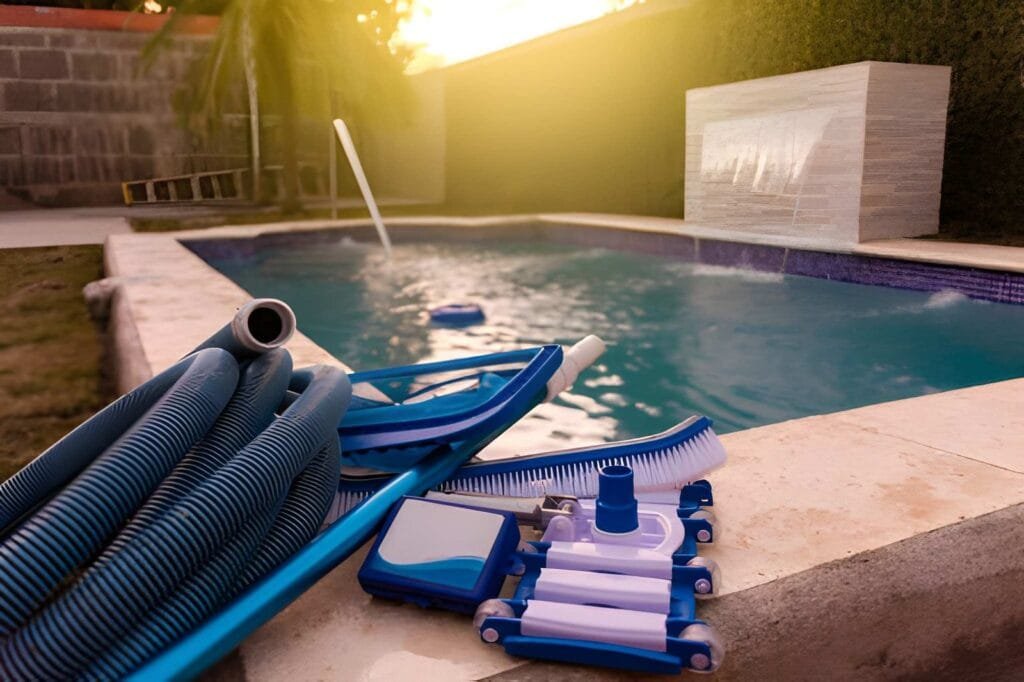
Remove leaves and large debris from the pool surface first. Check your vacuum hose for holes or cracks. Connect the hose tightly to the vacuum head and the skimmer. Ensure the pool pump is off before attaching the equipment. This prevents air from entering the system.
Setting The Filter Valve Correctly
Set the filter valve to the “Waste” or “Backwash” position. This setting avoids clogging the filter with dirt. It also sends debris directly out of the pool system. Turn the pump back on after setting the valve. Monitor the pressure gauge during vacuuming to ensure proper flow.
Vacuuming Techniques For Best Results
Start vacuuming slowly from the shallow end moving toward the deep end. Use smooth, overlapping strokes to cover the entire pool floor. Avoid rushing to prevent stirring up dirt. Clean the vacuum head regularly during the process. This keeps suction strong and efficient.
Troubleshooting Common Issues
Vacuuming a pool keeps it clean and safe. Sometimes, problems occur with the filter settings. These issues can stop your pool vacuum from working well. Knowing how to fix common problems can save time and effort.
Below are some frequent issues you may face with pool vacuum filters. Learn simple ways to solve them for smooth vacuuming.
Filter Clogging Problems
Filters trap dirt and debris from the pool water. Over time, they can fill up and block water flow. This reduces vacuum power and cleaning efficiency. Clean the filter regularly to avoid clogs. Backwash the filter if your system allows it. Rinse the filter with a hose to remove trapped dirt. Replace the filter cartridge if it is too dirty or damaged.
Pressure Fluctuations
Check the pressure gauge on your filter system. Pressure that is too high or low can cause poor vacuuming. High pressure often means the filter is clogged. Low pressure could indicate a leak or pump problem. Adjust the filter setting to the recommended level for vacuuming. Tighten any loose parts and inspect hoses for holes. Regular maintenance helps keep pressure steady during vacuuming.
Dealing With Debris Disposal
Vacuuming pulls debris into the filter system. Large debris can block hoses or clog the filter quickly. Use a skimmer net to remove big leaves before vacuuming. Check the debris basket and empty it often. Clean the pump strainer basket to keep water flowing. Proper debris disposal prevents damage and keeps the vacuum running smoothly.
Maintenance Tips For Filter Longevity
Keeping your pool filter in good shape extends its life and keeps water clean. Proper maintenance saves money and avoids frequent replacements. Follow easy steps to care for your pool filter regularly.
These tips help your filter work well and last longer. Clean filters trap dirt better and keep pool water clear. Small efforts make a big difference in pool care.
Regular Cleaning Schedules
Set a cleaning schedule for your pool filter. Clean it at least once every month. More often during heavy pool use or after storms. Regular cleaning stops dirt build-up. It keeps water flowing smoothly through the filter.
Checking For Wear And Tear
Look for cracks or broken parts on the filter. Worn parts reduce filter efficiency. Replace damaged pieces quickly. Inspect seals and O-rings for leaks. Fix issues before they get worse. This keeps the filter tight and working well.
Using Appropriate Cleaning Agents
Use cleaning agents made for pool filters only. Harsh chemicals can damage filter material. Follow product instructions carefully. Avoid bleach or household cleaners. Proper cleaners remove oils and dirt without harm. This protects your filter and pool water quality.
Frequently Asked Questions
What Filter Setting Is Best For Vacuuming A Pool?
The best filter setting for vacuuming a pool is “Filter” or “Filter Mode. ” This setting allows debris to be trapped while cleaning. Avoid “Backwash” or “Recirculate” as they bypass the filter. Always check your pool pump’s manual for specific instructions.
Can I Vacuum A Pool On The Backwash Setting?
No, vacuuming on the backwash setting is not recommended. Backwash directs water out of the system, bypassing the filter. This can damage your pump and waste water. Use the “Filter” setting to ensure debris is properly captured.
Should The Pool Pump Be On High Speed When Vacuuming?
Yes, running the pool pump on high speed during vacuuming is ideal. It increases suction power, effectively removing dirt and debris. Low speed may reduce cleaning efficiency. Ensure the pump is primed and running smoothly before vacuuming.
How Long Should I Vacuum My Pool Each Time?
Vacuum your pool for 15 to 30 minutes, depending on debris level. Avoid overworking the pump to prevent damage. Frequent short sessions are better than long ones. Always monitor the pressure gauge and clean the filter when necessary.
Conclusion
Choosing the right filter setting helps keep your pool clean and clear. Use the vacuum setting to remove dirt without damaging the system. Avoid too high or too low settings to protect your pump and filter. Regularly check the filter during vacuuming for best results.
Clean water means more fun and fewer problems. Keep your pool equipment in good shape to enjoy swimming all season. Simple steps make pool care easier and more effective.