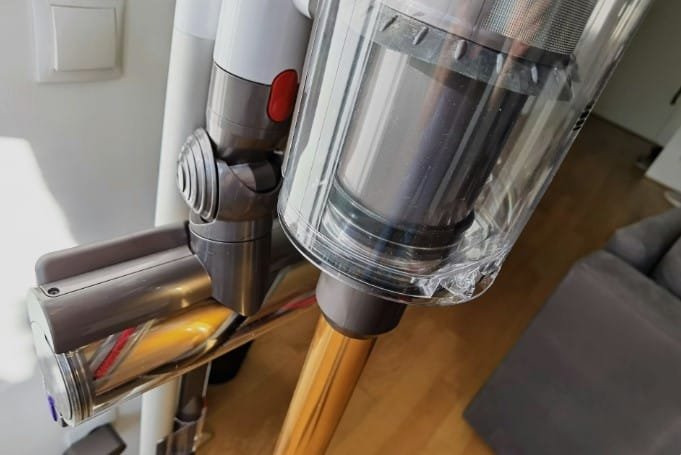
Are you ready to make cleaning easier and more efficient? Learning how to use your Dyson vacuum properly can save you time and effort while keeping your home spotless.
Whether you’re new to Dyson or want to get the most out of your vacuum, this guide will walk you through simple steps and tips. By the end, you’ll feel confident tackling any mess with ease. Keep reading to discover how to unlock the full power of your Dyson vacuum and enjoy a cleaner, healthier living space.
Choosing The Right Dyson Model
Choosing the right Dyson vacuum can make cleaning easier and faster. Dyson offers many models with different features. Picking the best one depends on your home, needs, and budget. This guide will help you find the perfect Dyson vacuum for your space.
Corded Vs Cordless Options
Corded Dyson vacuums plug into the wall. They offer constant power without worrying about battery life. These are good for big cleaning tasks and long sessions.
Cordless models run on batteries. They are lighter and easy to carry around. Perfect for quick cleanups and homes without many power outlets.
Think about your cleaning style. Do you need to move freely or clean for long periods? This will help you choose between corded and cordless.
Features To Consider
Look at suction power. Strong suction cleans better, especially on carpets. Check the vacuum’s weight. Lighter models reduce arm and wrist strain.
Consider the dustbin size. A bigger bin holds more dirt, so you empty it less often. Also, check for special tools like pet hair attachments or hard floor brushes.
Noise level matters. Some Dyson vacuums are quieter, which suits homes with babies or pets.
Budget And Usage Needs
Dyson vacuums come in various price ranges. Set a budget before shopping. Higher price often means more features and better power.
Think about how often you clean. For daily use, invest in a durable model. For occasional cleaning, a basic model might work well.
Match the vacuum’s features with your home size and cleaning habits. This saves money and gives the best cleaning experience.
Setting Up Your Dyson Vacuum
Setting up your Dyson vacuum is easy and quick. This step is important to get your vacuum ready for cleaning. Follow simple instructions to avoid any trouble later. The setup includes unpacking, charging, and adding accessories. Each part helps your vacuum work at its best.
Unboxing And Assembly
Start by carefully opening the box. Take out all parts and check them against the list. This ensures nothing is missing. Next, attach the main wand to the motor unit. Most Dyson models click together without tools. Secure the dust bin and filters in place. Your vacuum is almost ready.
Charging And Battery Care
Plug the charger into a power outlet. Connect it to the vacuum’s charging port. Let the vacuum charge fully before first use. This helps the battery last longer. Avoid overcharging by unplugging when full. Store the vacuum in a dry place to protect the battery.
Attaching Accessories
Dyson vacuums come with useful tools for different surfaces. Click the desired accessory onto the wand or motor unit. Common tools include crevice nozzles and brushes. Swap accessories easily during cleaning for best results. Store extras nearby for quick changes.
Operating The Vacuum Efficiently
Operating your Dyson vacuum efficiently saves time and cleans better. It helps use less energy and keeps your vacuum lasting longer. Understanding the vacuum’s settings and features makes cleaning easier. Follow simple steps to get the best results every time.
Selecting Cleaning Modes
Dyson vacuums offer different cleaning modes. Each mode fits certain cleaning needs. Choose a mode based on the dirt level and floor type. For light dust, use the gentle mode. For heavy dirt, switch to a stronger mode. This helps clean well without wasting power.
Adjusting Suction Power
Adjust suction power to match the surface you clean. Lower power works well on curtains or delicate rugs. Increase power for carpets or floors with stubborn dirt. Many Dyson models have easy controls to change suction. Use the right power to save battery and improve cleaning.
Using On Different Surfaces
Dyson vacuums work on many surfaces like hardwood, carpet, and tiles. Change the vacuum head or brush for each surface. Use a soft brush on hard floors to avoid scratches. For carpets, use a brush that loosens dirt deeply. Move the vacuum slowly for best cleaning on all surfaces.
Maintaining Your Dyson Vacuum
Maintaining your Dyson vacuum keeps it working well for a long time. Regular care helps the vacuum clean better and last longer. Simple steps can prevent damage and keep the vacuum’s power strong. Follow these tips to keep your Dyson in top shape.
Emptying The Dust Bin
Empty the dust bin after each use or when full. Remove the bin by pressing the release button. Hold it over a trash can and press the bottom to open. Shake gently to clear all dirt and dust. Clean the bin with a damp cloth if needed. Always let it dry before putting it back.
Cleaning Filters
Dyson vacuums have one or two filters. Remove them according to your model’s guide. Wash filters with cold water only. Do not use soap or detergents. Let filters dry completely for 24 hours before reinstalling. Clean filters every month for best performance.
Checking For Blockages
Check the hose, wand, and brush bar for blockages. Look for clogs that stop air flow. Remove any debris with a stick or brush. Avoid using sharp objects that can damage parts. Clear blockages quickly to keep suction strong.
Troubleshooting Common Issues
Troubleshooting common issues with your Dyson vacuum helps keep it running smoothly. Small problems often stop your vacuum from working well. Quick checks can fix most issues. Save time and avoid frustration by knowing what to do.
Battery And Power Problems
Check if the vacuum turns on. If not, the battery may be dead. Charge the vacuum fully before use. Clean the charging contacts with a dry cloth. Replace the battery if it won’t hold a charge. Avoid using the vacuum while charging. This can damage the battery life.
Suction Loss Causes
Loss of suction is a common issue. Start by emptying the dust bin. Clean or replace the filters regularly. Check for blockages in the hose or brush bar. Hair and debris can clog these parts. Remove any blockages carefully. Make sure all parts fit tightly together.
Accessory Fit And Function
Accessories must fit correctly for best performance. Attach them firmly to avoid air leaks. Check for cracks or damage on the parts. Clean the accessories after each use. Replace worn or broken tools to maintain suction. Using the right accessory helps clean better.
Maximizing Cleaning Results
Maximizing cleaning results with your Dyson vacuum is simple. It requires using the right techniques for different surfaces and tasks. Small changes in your routine can make a big difference. This section helps you clean deeper and faster.
Tips For Pet Hair Removal
Pet hair sticks tightly to furniture and floors. Use the Dyson’s motorized brush tool to pull hair from carpets. For hard floors, the soft roller head works best. Clean the brush often to keep it working well. Vacuum slowly over pet areas to catch more hair.
Handling Carpets And Hard Floors
Carpets need strong suction and a spinning brush to lift dirt. Use the carpet setting on your Dyson. For hard floors, switch to the soft roller to avoid scratches. Move the vacuum in straight lines to cover every spot. Avoid pushing too hard; let the vacuum do the work.
Scheduling Regular Cleaning
Set a cleaning schedule to keep your home fresh. Vacuum high-traffic areas at least twice a week. Deep clean carpets and rugs once a week. Regular cleaning stops dirt build-up and makes vacuuming easier. Keep your Dyson charged and ready for every use.
Frequently Asked Questions
How Do I Assemble A Dyson Vacuum Correctly?
To assemble a Dyson vacuum, follow the user manual step-by-step. Attach the wand, connect the cleaner head, and secure all parts firmly. Ensure filters and dustbin are in place before use. Proper assembly guarantees optimal vacuum performance and longevity.
How Do I Maintain And Clean A Dyson Vacuum?
Regularly empty the dustbin and wash filters as instructed. Clean the brush bar and remove hair or debris. Use a damp cloth for the vacuum body. Proper maintenance prevents clogs and maintains suction power effectively.
What Are The Best Dyson Vacuum Settings For Carpets?
Use the motorized cleaner head or carpet mode for deep cleaning. Adjust suction power if your model allows. Regularly clean brush bars to avoid hair buildup. This setting ensures thorough dirt and dust removal from carpets.
Can Dyson Vacuums Handle Pet Hair Efficiently?
Yes, Dyson vacuums are designed for pet hair removal. Use the motorized brush tool for stubborn fur. Regular cleaning of filters and brushes improves performance. These vacuums offer strong suction and effective pet hair pickup.
Conclusion
Using a Dyson vacuum keeps your home clean and fresh. Follow the simple steps to use it right. Regular cleaning helps the vacuum work better and last longer. Change filters and empty the bin often for best results. Enjoy a cleaner space with less effort every day.
Keep your Dyson in good shape by caring for it well. Simple habits lead to a healthier home and happy living. Give your vacuum a little attention, and it will serve you well.