Is your Dyson vacuum not picking up dirt like it used to? A clog could be the reason why your powerful machine is struggling.
Don’t let a simple blockage keep your home from staying clean and fresh. In this guide, you’ll discover easy, step-by-step ways to unclog your Dyson vacuum quickly and safely. Whether you’re dealing with trapped hair, dust, or debris, these tips will get your vacuum running like new again.
Keep reading to bring back the full cleaning power of your Dyson without spending a dime on repairs.
Common Causes Of Clogs
Dyson vacuums are strong and reliable. Still, clogs can happen. Knowing common causes helps fix problems quickly. This keeps your vacuum working well. Below are the usual reasons for blockages in Dyson vacuums.
Hair And Debris Buildup
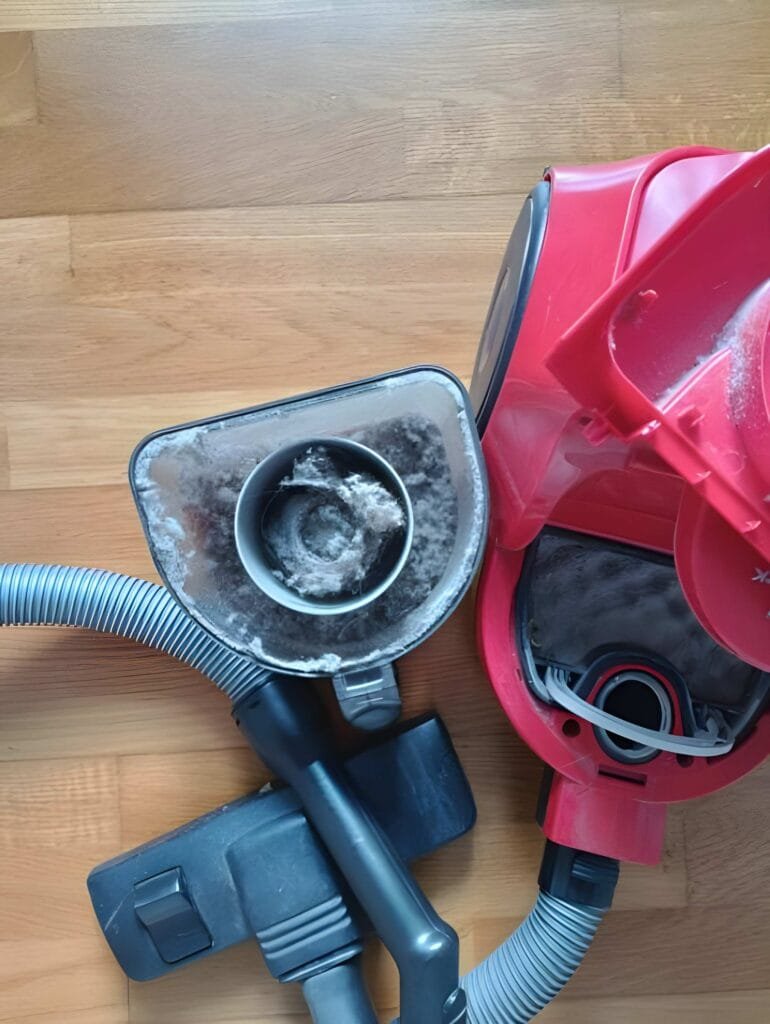
Hair and small debris wrap around parts easily. They block airflow and reduce suction power. Long hair from pets or people is a main cause. Dust and dirt mix with hair, creating stubborn clogs. Regular cleaning prevents buildup and keeps the vacuum clear.
Blockages In The Hose
The hose can trap large items like toys or paper. These objects stop air from moving through. Small clumps of dirt also stick inside the hose walls. A blocked hose causes the vacuum to lose suction. Checking and clearing the hose helps avoid this issue.
Clogged Brush Bar
The brush bar spins to loosen dirt on floors. Hair and strings get tangled around it. This stops the brush from turning properly. A stuck brush bar lowers cleaning performance. Removing wrapped debris keeps the brush bar spinning freely.
Obstructed Air Pathways
Air moves through many parts inside the vacuum. Dust and debris can block these passages. Filters may also get clogged, reducing airflow. Blocked air pathways cause the motor to overheat. Cleaning filters and internal parts improves airflow and suction.
Tools Needed For Unclogging
Unclogging a Dyson vacuum requires the right tools. Using proper tools makes the job easier and safer. It helps remove dirt and blockages effectively. Prepare these items before starting to save time and avoid damage.
Screwdriver And Scissors
A screwdriver helps open parts of the vacuum. Many Dyson models have screws securing the brush bar or cover. Scissors cut hair and threads wrapped around the brush. Keep scissors sharp for clean cuts. Handle both tools carefully to avoid injury.
Compressed Air Canister
Compressed air clears dust from hard-to-reach areas. It blows out dirt from the filters and crevices. Use short bursts to avoid damage. This tool prevents pushing dirt deeper inside. It keeps the vacuum running smoothly.
Cleaning Brush
A small cleaning brush removes stuck debris. Use it to clean filters and brush bars. Soft bristles avoid scratching vacuum parts. It helps maintain suction power. Clean parts regularly to extend vacuum life.
Protective Gloves
Wear protective gloves to keep hands clean and safe. Gloves protect from sharp objects inside the vacuum. They also prevent skin irritation from dust and dirt. Choose gloves with a good grip for better handling. Gloves make the task more comfortable.
Step-by-step Unclogging Process
Clogged Dyson vacuums reduce cleaning power. Clearing blockages keeps your vacuum working well. Follow this simple step-by-step unclogging process. It helps fix common clogs fast and easy.
Turn Off And Unplug Vacuum
Always start by turning off your Dyson vacuum. Unplug it from the power socket. This prevents any accidents while cleaning the vacuum parts.
Remove The Dust Bin
Press the release button to detach the dust bin. Empty the bin completely into a trash can. Wipe the bin with a dry cloth to clear dust.
Check And Clear The Hose
Detach the hose carefully from the vacuum. Look through the hose for any blockages. Use a long object or a flexible brush to push out clogs.
Clean The Brush Bar
Flip the vacuum to see the brush bar underneath. Remove hair and debris wrapped around the brush. Use scissors to cut tangled threads, then pull them off.
Inspect The Cyclone And Filters
Open the cyclone section and check for dust build-up. Tap gently to remove trapped dirt. Remove and wash the filters with cold water. Let them dry completely before reinstalling.
Tips To Prevent Future Clogs
Preventing future clogs keeps your Dyson vacuum working well. It saves time and effort. Simple habits help avoid blockages and maintain strong suction power. Follow these easy tips to keep your vacuum clean and clear.
Regular Maintenance Routine
Clean your vacuum after every few uses. Check the brush bar for hair and debris. Empty the dust bin before it gets full. Clear the wand and hose from any dirt. Regular checks stop clogs from forming.
Proper Use Of Attachments
Use the right attachment for each cleaning task. Small tools help reach tight spaces without clogging. Avoid forcing large objects into narrow parts. Proper use prevents dirt buildup inside the vacuum.
Avoiding Large Debris
Pick up big pieces by hand before vacuuming. Large debris can block the hose or brush. Do not vacuum sharp or hard items that may cause damage. Keeping large debris out protects your vacuum’s parts.
Timely Filter Replacement
Change filters as recommended in the manual. Dirty filters reduce airflow and cause clogs. Clean reusable filters regularly with water. Dry filters completely before reinstalling to prevent mold and damage.
When To Seek Professional Help
Knowing when to seek professional help is key to keeping your Dyson vacuum working well. Some problems may need expert tools or skills. Trying to fix these issues alone can cause more damage. Here are signs that it is time to call a professional technician.
Persistent Clogs
Clogs that stay after several cleaning attempts need expert attention. Professionals can open parts safely and find hidden blockages. Persistent clogs can harm the motor or reduce suction power. Avoid using sharp objects that can damage internal parts.
Unusual Noises Or Smells
Strange sounds or burning smells mean the vacuum has a serious issue. These signs might show motor or belt problems. Ignoring these symptoms can cause costly repairs. A technician can diagnose the cause and fix it safely.
Electrical Issues
Vacuum not turning on or cutting off often may have electrical faults. Problems with wiring, switches, or the battery require professional care. Attempting to fix electrical issues yourself is risky. Always let an expert handle these repairs to avoid injury or damage.
Frequently Asked Questions
How Do I Know If My Dyson Vacuum Is Clogged?
Check for reduced suction or strange noises. Inspect the hose and brush bar for blockages. Clear any visible debris to restore performance.
What Tools Do I Need To Unclog A Dyson Vacuum?
Use a flashlight, a straightened wire hanger, and a soft cloth. These help locate and remove clogs safely and effectively.
How Can I Safely Remove Clogs From A Dyson Vacuum?
Turn off and unplug the vacuum first. Detach the hose and brush bar. Gently pull out debris with a tool or your hands.
Can I Use Water To Clean My Dyson Vacuum Hose?
Yes, but only if the hose is detachable and fully dry afterward. Avoid water near the motor or electrical parts.
Conclusion
Clearing a Dyson vacuum clog is simple with the right steps. Regular checks help keep your vacuum working well. Removing blockages quickly saves time and effort. Use the tools and tips shared here for best results. Clean your vacuum often to avoid future clogs.
A smooth-running vacuum makes cleaning easier and faster. Keep your home tidy with a well-maintained Dyson. Small actions can prevent big problems later. Stay patient and gentle while unclogging for safety. Your vacuum will thank you with better performance.